
Nothing derails an indoor golf session faster than a smudged, dusty, or scuffed impact screen. Marks from dirty balls, environmental dust, and accidental contact can blur your visuals and drag down immersion. Worse, the wrong cleaning approach can permanently damage delicate screen coatings. Learning how to clean a golf simulator screen properly protects your image quality and extends the lifespan of your setup.
This guide walks you through the safest cleaning routines, which products to embrace and which to avoid, plus preventive habits that keep marks from forming in the first place. Whether you run a Trackman, Carl’s Preferred, or Garmin Approach R10 simulator, you’ll finish this article with the confidence to clean without causing damage.
Choose the Right Cleaning Tools
Use Microfiber Cloths Only
Always reach for a clean, lint-free microfiber cloth. This is the single most important rule. Paper towels, tissues, and standard cotton rags can scratch the screen surface and leave behind fibers that grind into the material during wiping. Microfiber traps dust effectively while staying gentle on sensitive coatings. Keep at least two cloths on hand: one for dry dusting and another for occasional damp cleaning.
Avoid Harsh or Abrasive Materials
Never reach for scrub pads, abrasive sponges, or rough towels, even if a stain feels stubborn. Impact screens are engineered to absorb ball strikes, not resist abrasive cleaning. Micro-scratches from rough materials may seem invisible at first but gradually degrade image clarity over time. Stick exclusively to microfiber for every cleaning session.
Follow Safe Cleaning Techniques
Start With Dry Dusting
Begin every cleaning session with a dry microfiber cloth to lift loose dust and debris. Wipe gently in circular motions across the entire surface. Skipping this step risks grinding particles into the screen when you introduce moisture, which can create permanent scuffs. Make dry dusting a weekly habit, especially if your simulator lives in a garage or high-dust environment.
Dampen the Cloth Instead of Spraying the Screen
When water is needed, lightly dampen your microfiber cloth with distilled water. Never spray liquid directly onto the screen. Distilled water avoids the mineral deposits that tap water leaves behind. Wipe gently in circular motions using minimal pressure. Excessive force can damage internal fibers or protective coatings, especially on fabric-based impact screens.
Clean Stubborn Marks Safely
For smudges that won’t budge with water alone:
– Try a screen-safe wipe labeled for oleophobic coatings (the same type used for smartphones and eyeglasses)
– Use 70% isopropyl alcohol sparingly by applying it to the cloth, never the screen
– Always test any new method in a small, inconspicuous area first and wait 5 to 10 minutes to check for clouding or discoloration
Avoid ammonia-based cleaners like Windex and any alcohol-heavy solutions, as these permanently degrade screen coatings over time.
Use Manufacturer-Approved Methods

Trackman: Magic Eraser or Baby Wipes
Trackman officially recommends using a magic eraser or baby wipes to clean its impact screens. These are gentle enough for routine use yet effective against light scuffs and smudges. Pair this method with the habit of hitting only clean, unscuffed balls to prevent future marks. A video guide is available through Trackman support for full maintenance procedures.
Pro Tip: Use the magic eraser with light pressure. Pressing too hard can gradually thin the screen material over time.
Carl’s Preferred: Contact the Manufacturer First
Carl’s Preferred does not publish public cleaning instructions. Forum users who reached out directly received personalized guidance via email. The company recommends contacting them before attempting any cleaning method to avoid voiding warranty coverage or damaging the proprietary screen material.
Warning: Steaming has been mentioned by some users as a cleaning method, but it remains unverified and risky for Carl’s screens. Do not attempt this without manufacturer approval.
Garmin Approach R10: Water-Only Preferred
For the Garmin Approach R10, the safest method according to user consensus is distilled water paired with a microfiber cloth. The screen’s coating is sensitive to both alcohol and ammonia, so any cleaner containing these should be avoided entirely. If you reach for wipes, confirm they are labeled safe for oleophobic coatings.
Prevent Damage With Smart Habits
Never Spray Liquids Directly Onto the Screen
Spraying any liquid, including water, cleaner, or disinfectant, increases the risk of moisture seeping into seams, edges, or backing material. This can cause warping, mold, or delamination over time. Always apply liquid to the cloth first, then wipe.
Avoid Alcohol and Ammonia
While 70% isopropyl alcohol can be used sparingly on tough smudges, do not make it a habit. Repeated use strips protective coatings and shortens screen life. Ammonia-based products are explicitly prohibited by Garmin R10 users and should never touch any impact screen.
Skip Oxy Clean and Laundry Products
One forum user suggested Oxy Clean based on its effectiveness on polyester fabrics, but this remains unverified for impact screens. These screens are engineered composites, not basic cloth, and laundry detergents risk chemical damage that no manufacturer endorses.
Prevent Marks Before They Happen
Use Clean, Unscuffed Golf Balls
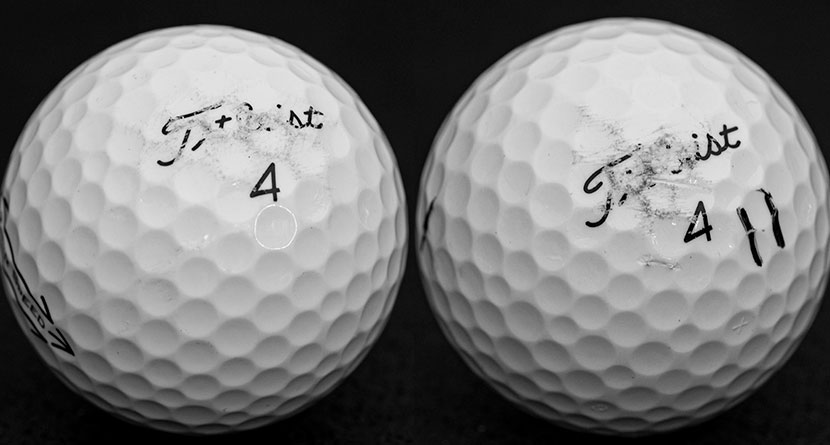
The leading cause of screen marks is hitting dirty or scuffed balls. Dust, mud, or rough patches transfer directly to the screen on impact. Make it a rule to use only clean, smooth balls, and keep a microfiber towel nearby to wipe balls between swings, especially if they live in a garage or outdoor bag.
Install Flooring Before Testing
Several users reported dirt marks from testing their simulator before installing turf or flooring. Without ground cover, dust kicks up during swings and sticks to the screen. Complete your setup, including the floor, before powering on the system for the first time.
Keep the Screen Covered When Idle
If your simulator sits in a shared or dusty space, cover the screen when not in use. A breathable fabric cover blocks dust and accidental contact. Avoid plastic covers that trap moisture and encourage mold growth.
Handle Tough Stains Carefully
Test Any New Method First
Before applying any cleaner, whether baby wipes, magic eraser, or alcohol, test it in a small corner of the screen. Wait 5 to 10 minutes, then inspect for clouding, discoloration, or texture changes. If the test area looks clean, proceed cautiously across the rest of the surface.
Address Persistent Marks Without Scrubbing
If a mark refuses to lift with water or safe wipes:
– Try a damp magic eraser with light pressure (Trackman screens only)
– For Garmin or Carl’s screens, contact the manufacturer before escalating
– Search forum threads for users with the same screen model who have shared fixes
Never scrub aggressively. Impact screens are designed to flex, not withstand forceful cleaning.
Maintain a Consistent Cleaning Routine
Weekly Dry Wipe-Down
Set a reminder to dry-dust your screen weekly using a microfiber cloth. This quick habit prevents buildup and keeps the surface ready for play. It takes less than two minutes and significantly extends screen life.
Monthly Deep Inspection
Once a month, examine the screen under good lighting for embedded dirt, fading, coating damage, or persistent marks. Catching problems early lets you address them with the safest method before they become permanent stains.
Replace When Necessary
Even with perfect care, impact screens eventually wear out. If you notice thinning material, holes, or unremovable stains, it may be time for a replacement. Regular cleaning extends lifespan, but it cannot stop natural wear from thousands of ball impacts.
Frequently Asked Questions About Cleaning Golf Simulator Screens
What is the safest way to clean a golf simulator screen?
The safest method is a dry microfiber cloth followed by a lightly dampened microfiber cloth with distilled water if needed. Always wipe in gentle circular motions and never spray liquid directly on the screen.
Can I use Windex or ammonia-based cleaners on my impact screen?
No. Ammonia-based cleaners like Windex permanently degrade screen coatings over time. Stick to distilled water or screen-safe wipes designed for oleophobic coatings.
Are magic erasers safe for all golf simulator screens?
Magic erasers are officially recommended only for Trackman screens. For other brands, contact the manufacturer first. Always use light pressure to avoid thinning the material.
How often should I clean my golf simulator screen?
A weekly dry dusting is ideal for routine maintenance. Conduct a deeper inspection and cleaning once a month, or more often if the simulator sits in a dusty environment.
Will isopropyl alcohol damage my screen?
70% isopropyl alcohol can be used sparingly for stubborn smudges, but it should never be a regular cleaner. Repeated use strips protective coatings. Always apply it to the cloth, not the screen, and test a small area first.
How do I prevent ball marks on my simulator screen?
Use only clean, unscuffed golf balls, install flooring before testing, and keep the screen covered when not in use. These three habits eliminate most marks before they form.
Key Takeaways for Cleaning Your Golf Simulator Screen
Cleaning a golf simulator screen comes down to three core principles: use only microfiber cloths, avoid harsh chemicals like ammonia and most alcohol-based products, and prevent marks before they appear through clean balls and proper setup. Stick to distilled water for routine cleaning and contact the manufacturer whenever you face uncertainty about a specific screen brand.
Your next step is simple: schedule a weekly dry-dusting reminder today and stock your simulator area with two clean microfiber cloths. This small habit will keep your visuals crisp and your screen lasting for years of accurate, immersive play.