Getting the distance right between you and the screen is the single most important decision in any golf simulator setup. Place the screen too close and your shots scatter, your launch monitor scrambles for clean data, and your expensive screen takes beatings it was never designed to absorb. Place it too far and your projector image goes dim while your room feels empty and disconnected. The sweet spot for most home simulators sits between 8 and 10 feet from the ball to the impact screen. This guide walks you through every distance decision, from projector throw to launch monitor placement, so your indoor golf room performs exactly the way you expect.
Below you will learn the ideal hitting distances, how to calculate projector placement, launch monitor positioning rules, room layout planning, and the most common mistakes that ruin otherwise solid setups.
Ideal Ball-to-Screen Distance
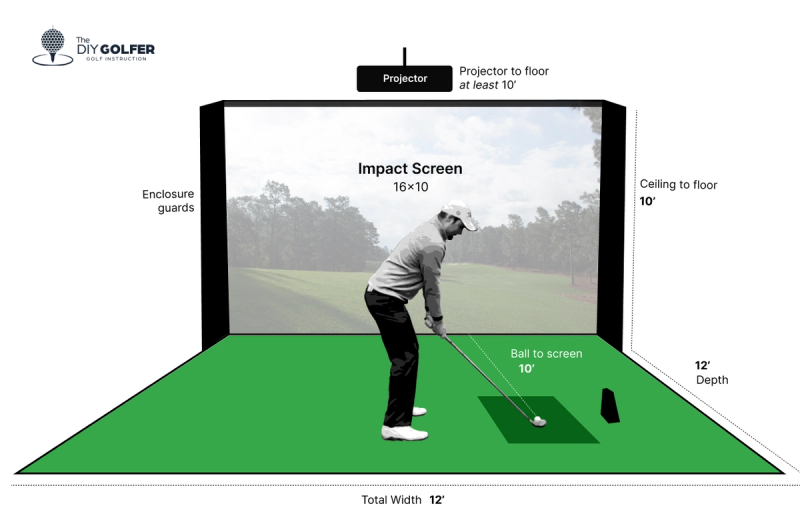
The gap between your ball and the impact screen drives both safety and data quality. Hit too close and you risk damage, lost accuracy, and erratic shot feedback.
Standard 8 to 10 Feet for Most Setups
For the typical home golf simulator, 8 to 10 feet from the ball to the screen covers everything you need. This range supports:
– Full driver swings with a normal club length
– Reliable tracking from radar-based monitors like SkyTrak or Mevo
– Sufficient capture time for camera-based units such as GCQuad or GC3
Dropping under 8 feet raises the chance of striking the screen and leaves the launch monitor too little time to record ball and club data accurately, especially at higher swing speeds.
Can You Go Under 8 Feet?
Short rooms can still work in the 6 to 7 foot range if you accept trade-offs:
– Pair the room with a high-speed launch monitor (Flightscope Mevo+ or TrackMan Portable)
– Stick to irons and partial wedge shots rather than full drivers
– Use a dense, tightly stretched impact screen rated for close-range hits
Shorter distances compress ball flight data, which slightly reduces simulation realism but keeps the build feasible in tight basements or spare rooms.
When 10+ Feet Works Better
Rooms longer than 10 feet offer clear advantages:
– Full freedom of swing with zero contact risk
– Room for rear projection setups
– Extra space for accurate ball flight calculation
Past 12 feet without scaling up your projector or screen, image brightness and clarity can suffer, so balance your room length with your projection goals.
Projector Placement Distance
Your projector lives in a different measurement zone from your hitting distance, but it matters just as much for picture quality.
Front vs. Rear Projection
Front projection sits behind the golfer and throws forward onto the screen. This layout usually requires:
– The projector mounted 2 to 3 feet behind the tee
– A total room depth of 12 to 15 feet including player space
Rear projection places the projector behind the screen in a closet or secondary room. It eliminates shadows from your body and club but consumes more total depth.
Throw Distance Formula
Calculate your projector placement with this simple rule:
– Throw Distance = Screen Width × Throw Ratio
For example, a 10-foot wide screen paired with a 1.5 throw ratio projector needs 15 feet of projector distance. Most consumer projectors fall between 1.2 and 2.0 throw ratios, so always check your specific model’s specs before mounting.
Short-Throw Projectors Save Space
Short-throw models with ratios under 1.0 project large images from just a few feet back. A 0.8 throw ratio projector can fill a 10-foot image from 8 feet away, making it perfect for rooms under 12 feet deep. Look at models like the Epson Pro L1755U or Optoma ZU750T designed for simulator use.
Launch Monitor Positioning
Your launch monitor needs a clear, precise position relative to the ball and screen. Each technology type has its own rules.
Radar-Based Monitors (SkyTrak, Mevo)
These Doppler radar units detect club and ball motion. Place them:
– 6 to 8 inches behind the ball for a top-down view
– Elevated on a tripod or mount at manufacturer height
– Centered along the target line
Keep the flight path between ball and screen fully unobstructed for clean readings.
Camera-Based Systems (GCQuad, GC3)
High-speed cameras need an unobstructed line of sight:
– Mounted below the ball, looking upward
– With at least 12 inches of clearance under the hitting mat
– Away from reflective surfaces that could distort images
Follow each manufacturer’s recessed or flush-floor mounting guidelines closely.
Keep the Ball-to-Screen Zone Clear
The launch monitor itself does not need extra space from the screen, but the ball’s flight path must travel unimpeded from strike to impact. Keep PCs, cables, and accessories out of the 8 to 10 foot hitting zone.
Room Layout and Space Planning
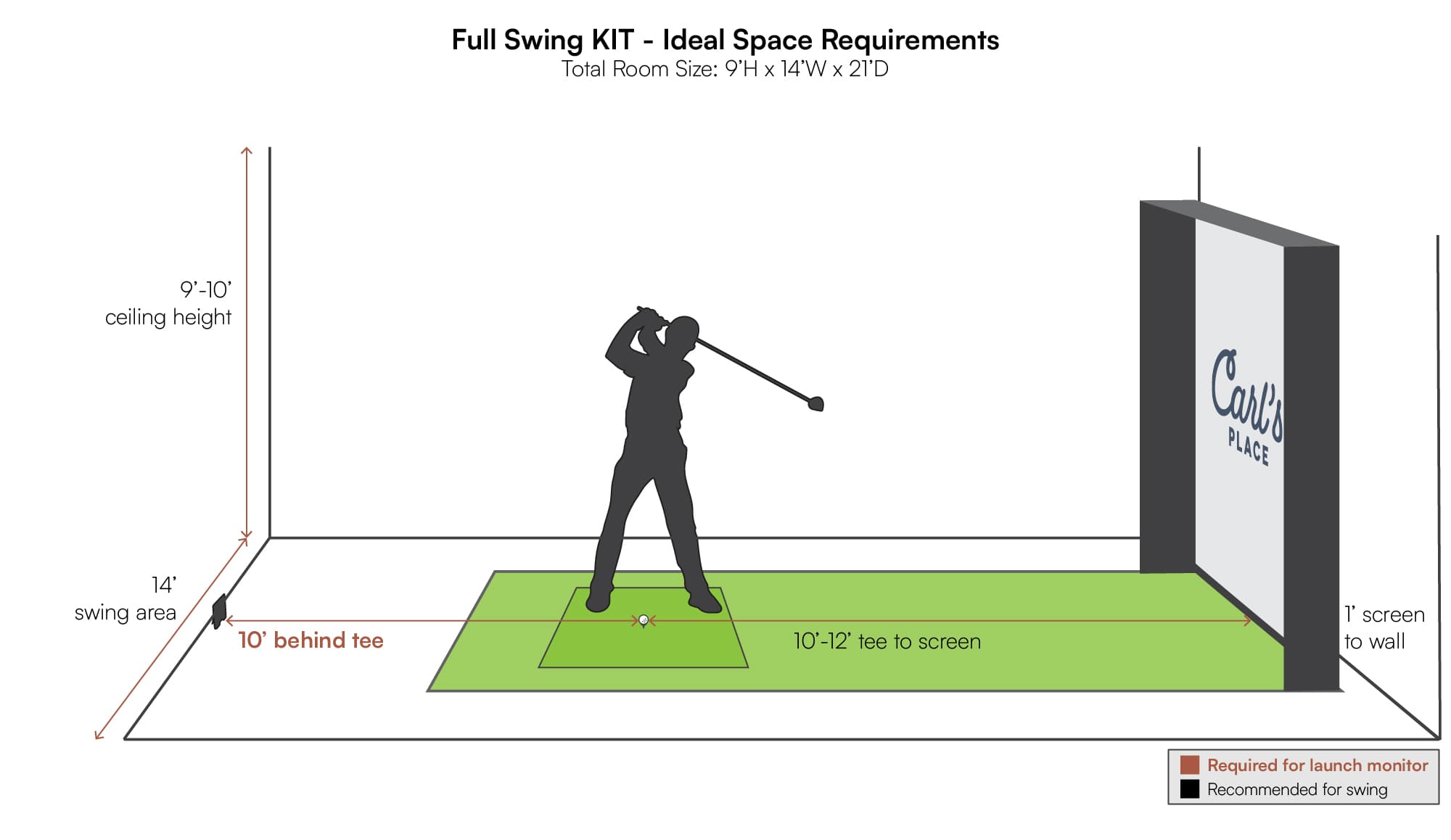
Designing the room comes before buying equipment. A poorly planned layout wastes even the best gear.
Minimum Room Dimensions
For a working home simulator:
– Length: 10 to 12 feet (ball to screen plus clearance)
– Width: 10 to 12 feet (stance and swing arc)
– Ceiling Height: 9 to 10 feet (avoid ceiling strikes)
Tighter spaces still work with net enclosures or hybrid screen and net combos.
Swing Clearance Zones
Mark these areas with painter’s tape before installing anything:
– Backswing: At least 3 feet behind the player
– Downswing: Full arc clearance on the lead side (left for right-handers)
– Follow-through: 4 or more feet in front of the ball
– Ceiling: 8 or more feet above the clubhead at the top of the swing
Sample 12x12x9 Room Layout
- Tee position: 3 feet from the back wall
- Ball to screen: 9 feet
- Projector: 2 feet behind the tee (11 feet from the screen)
- Launch monitor: 6 inches behind the ball, elevated
- Seating and PC: Side-mounted or in a rear closet
This layout supports a full driver swing and front projection comfortably.
Screen Size and Viewing Distance
The screen doubles as your impact target and your viewing surface, so size and viewing distance both matter.
Standard Screen Sizes
Most home simulators use:
– 9×9 feet for 10×10 rooms
– 10×10 feet for 12×12 or larger rooms
– Custom sizes for angled walls or L-shaped spaces
Leave at least 6 inches of clearance around the screen frame to absorb ball impact safely.
Optimal Viewing Distance
Stand or sit 8 to 12 feet from the screen for the best visual experience:
– Center your eyes with the horizon line shown in the simulation
– Avoid sitting too close to prevent eye strain
– This range also sharpens depth perception for putting and approach shots
Common Setup Mistakes

Even careful builders make errors that hurt performance and safety.
Placing the Screen Too Close
Putting the screen within 7 feet of the ball causes:
– Frequent screen strikes and frame damage
– Inaccurate spin and launch data from compressed ball flight
– Reduced ball flight calculation time for the launch monitor
Honor the 8-foot minimum unless your system is explicitly rated for shorter distances.
Ignoring Projector Offset
Many projectors cannot sit in line with the screen center and need vertical or horizontal lens shift. Skip this step and you get:
– A cropped image
– Forced digital zoom that lowers resolution
– Keystoning that warps the picture
Mount according to your projector’s lens shift and offset specifications.
Blocking the Launch Monitor
Mats, cables, or stands in front of or behind the ball scatter sensor data. Always:
– Keep the area behind the ball clear
– Route cables under the floor
– Use low-profile hitting mats
Even a small object in the wrong spot causes missed shots and false readings.
Tips to Optimize Your Simulator Setup
Small adjustments can lift your simulator from functional to outstanding.
Calibrate Your Launch Monitor Regularly
Most systems include calibration sticks or built-in apps. Use them to:
– Align the monitor with the target line
– Adjust for uneven floors or tilted mounts
– Confirm distance settings in the software
Recalibrate monthly or any time you move equipment.
Add a Pre-Screen Net
Install a secondary net 1 to 2 feet in front of the impact screen to:
– Reduce wear on the main screen
– Slow ball speed before impact
– Lower rebound risk back toward the player
Use high-tensile nylon mesh rated for direct golf ball impact.
Test with Full Swings Before Finalizing
Before locking in your layout, hit multiple drivers and long irons. Watch for:
– Consistent ball flight and data on the screen
– Shadows from your body or club
– Tracking errors or close calls with the screen
Adjust distances if anything looks off.
Frequently Asked Questions About Golf Simulator Distances
What Is the Minimum Distance from Ball to Screen in a Golf Simulator?
The minimum recommended distance is 8 feet from the ball to the impact screen. Anything shorter risks contact with the screen and reduces launch monitor accuracy, especially for faster swing speeds.
Can I Use a Golf Simulator in a Room Shorter Than 10 Feet?
Yes. Rooms as short as 6 to 7 feet can work with high-speed launch monitors, durable screens, and a swing limited to irons and partial shots. Full driver swings are not recommended in sub-10-foot rooms.
How Far Should the Projector Be from the Screen?
Use the formula Throw Distance = Screen Width × Throw Ratio. A 10-foot wide screen with a 1.5 throw ratio projector needs about 15 feet of throw distance. Short-throw projectors (ratios under 1.0) reduce this dramatically.
How Far Behind the Ball Should a Radar Launch Monitor Sit?
Radar units such as SkyTrak or Mevo should sit 6 to 8 inches behind the ball, elevated on a mount and centered with the target line for clean Doppler readings.
Does Ceiling Height Affect Simulator Distance Requirements?
Yes. Aim for 9 to 10 feet of ceiling height so the clubhead has at least 8 feet of clearance at the top of the swing. Lower ceilings restrict driver swings and force flatter swing planes.
What Happens If My Screen Is Too Close to the Ball?
A screen placed too close causes frequent strikes, inaccurate spin and launch data, and limited ball flight calculation time. Data compression at short distances reduces realism in the simulation software.
Key Takeaways for Setting the Right Distance from Screen in a Golf Simulator
The core distance rule is simple: keep 8 to 10 feet between the ball and the impact screen for most home setups. Match that distance to your launch monitor’s technology, your projector’s throw ratio, and your room dimensions before mounting anything. Measure your swing zone with painter’s tape, calibrate your monitor after every equipment change, and add a pre-screen net if you want extra protection and longevity. With the right distances locked in, your indoor golf room will deliver accurate data, vivid visuals, and safe, repeatable swings every time you step up to the tee.