
Walking past a bare garage or spare room and picturing it as a private golf haven feels exciting. The right golf simulator design ideas turn unused square footage into a high-performance practice zone that rivals your local course. Smart planning around layout, lighting, and tech ensures every swing feels natural and every shot tracks accurately.
This guide walks you through practical choices for room dimensions, screen setup, flooring, audio, and decor. You’ll learn which upgrades deliver the biggest impact and how to avoid costly mistakes. Whether you’re a scratch golfer or a weekend player, these strategies help you build a space that elevates your game and impresses your guests.
Optimize Room Dimensions and Swing Clearance
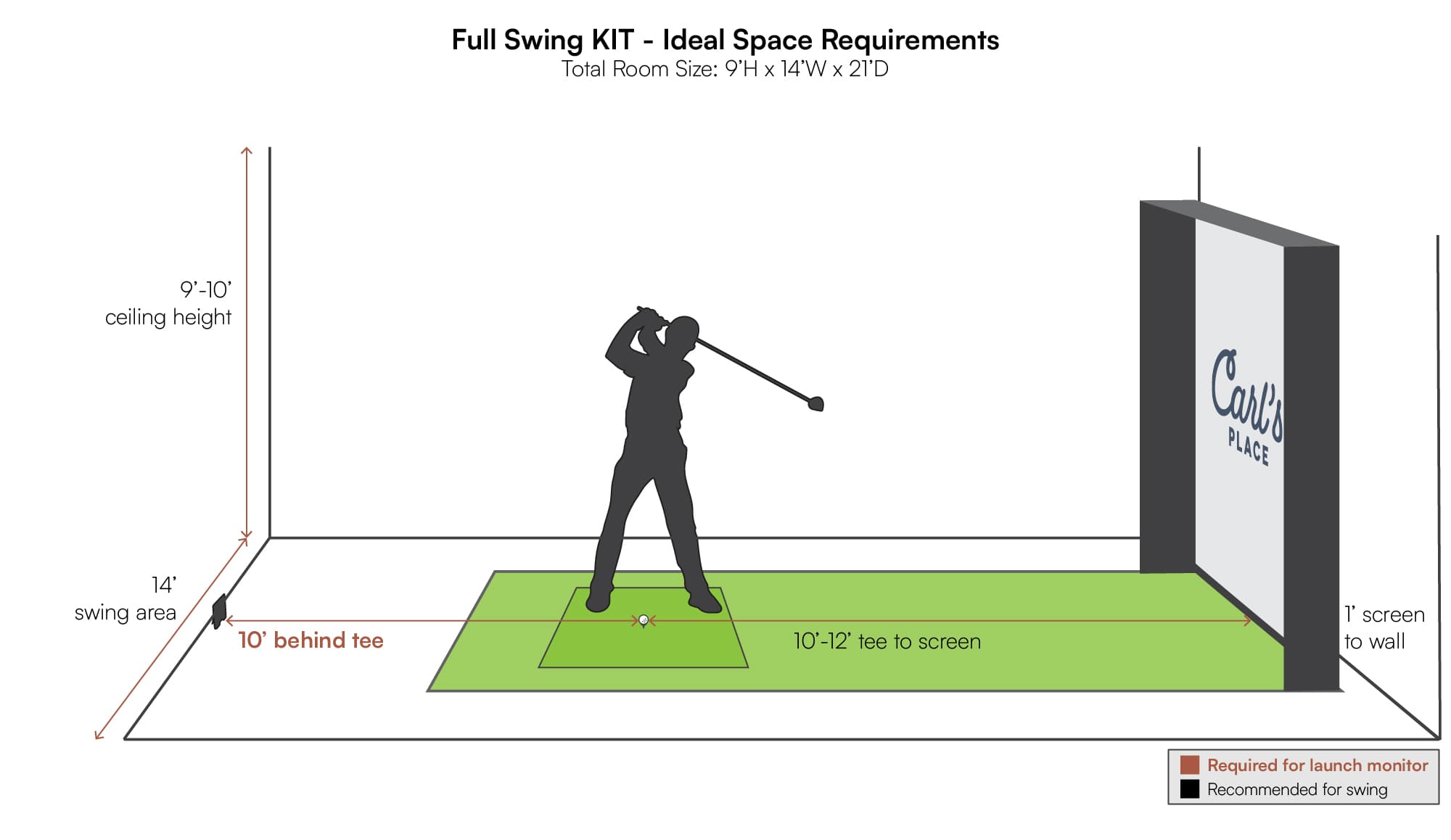
Measure for Safe, Full Swings
Plan for 10 feet of depth from the tee to the screen, with 8 feet of ceiling height to clear high backswings. Add 10–12 feet behind the golfer so drivers never clip walls or ceilings. Skimping on space forces swing adjustments that hurt consistency and risk damage to your room.
Position Equipment Without Obstruction
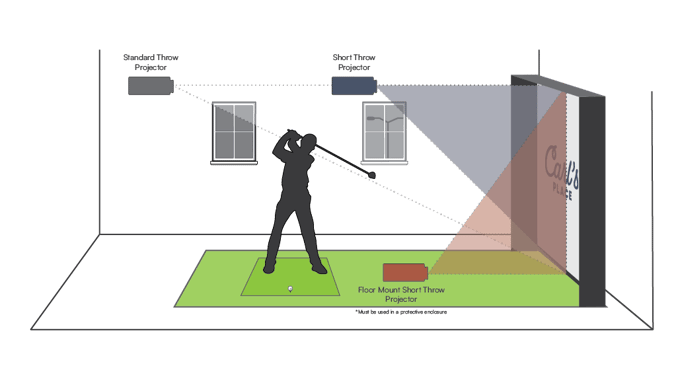
Mount the projector at the correct throw distance, usually 12–16 feet for ceiling models. Keep speakers, support beams, and furniture outside the swing arc. Lay painter’s tape on the floor to mark zones before committing to a layout.
Plan for Multi-Use Flexibility
If the room doubles as a media space, choose retractable screens or a motorized projector that lifts out of sight. Foldable hitting mats and mobile turf tiles let you reclaim floor space in minutes for movie nights or family time.
Control Lighting for Better Visibility
Install Dimmable Ambient Lighting
Run dimmable LED strips along baseboards or ceiling coves to keep ambient light low. Warm white tones between 2700K and 3000K mimic the relaxed glow of a country club lounge without washing out the screen.
Eliminate Overhead Glare
Skip recessed ceiling lights directly over the hitting area. If you cannot move them, add baffles or directional hoods to block downward beams. Wall sconces or angled floor lamps deliver light without hitting the screen.
Add Task Lighting Near Tech Zones
Place focused lighting near control panels, launch monitors, and seating. A small under-cabinet strip or adjustable desk lamp helps you tweak settings without ruining screen contrast.
Choose the Right Screen and Projector
Select a High-Lumen, Low-Latency Projector
Pick a 4K projector with 3000+ lumens and input lag under 30ms for sharp, responsive visuals. Models like the Epson Pro Cinema or Sony VPL-VW295ES deliver brightness that holds up even when you cannot fully darken the room.
Size and Mount the Screen Properly
A 12- to 14-foot diagonal screen fits most residential setups. Choose a fixed-frame or tensioned screen to prevent wrinkles that distort ball flight. Position the bottom edge 3–4 feet off the floor for a realistic perspective on every shot.
Align the Projector with Screen Center
Mount the unit ceiling-centered behind the golfer, lined up with the screen’s midpoint. Use lens shift and zoom for fine-tuning. Avoid keystone correction, which softens the image and adds input delay.
Build a Durable, Safe Floor System
Install Shock-Absorbing Turf Underlayment
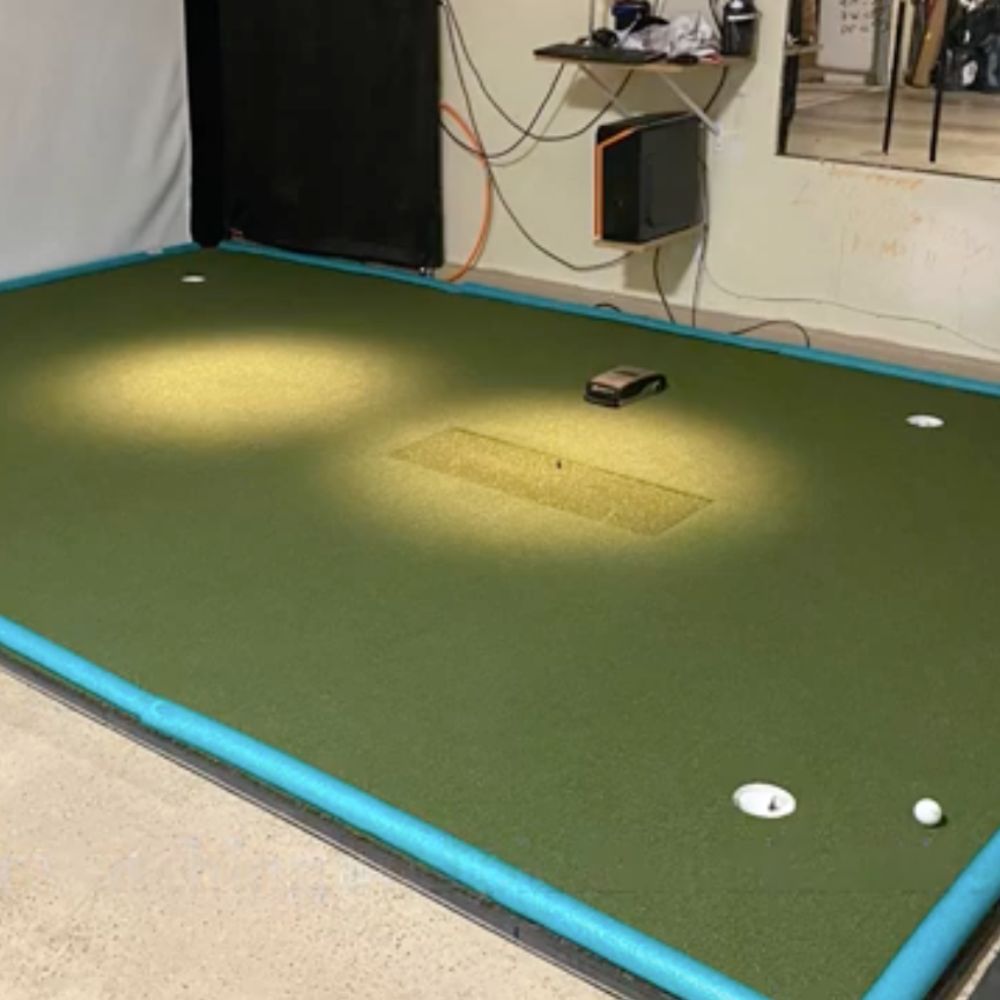
Lay high-density foam padding (6–8 lb density) beneath synthetic turf. This cushion reduces joint fatigue, improves ball bounce realism, and protects the subfloor from repeated impact.
Define Zones with Functional Flooring
Use interlocking rubber tiles around the perimeter for traction and easy replacement. Keep the central 6×6 ft hitting zone level and anchored so the mat never shifts mid-swing.
Add Netting or Impact Barriers
Hang 20×20 ft netting with 1-inch mesh from ceiling to floor on the side walls. Secure it with ceiling anchors and wall brackets, and reinforce corners with extra ties to contain errant drives.
Integrate an Immersive Audio Experience
Set Up Surround Sound for Realism
Place front left and right speakers near the screen, a center channel above or below it, and rear speakers behind the golfer. Weather-resistant models like the Polk Audio Atrium handle indoor humidity without distortion.
Reduce Echo with Acoustic Treatment
Cover side walls with acoustic panels or foam baffles to absorb reflections. Heavy curtains or fabric-wrapped walls also soften sound and sharpen audio clarity.
Sync Audio Feedback with Shot Data
Enable real-time swing sounds and crowd reactions through your simulation software. Some platforms offer custom clap meters or caddie commentary that react to shot quality for extra engagement.
Connect Advanced Tech and Software
Pair with Professional-Grade Launch Monitors
Integrate systems like TrackMan, Full Swing, or SkyTrak for precise ball and club tracking. Position the sensor 6–8 feet behind the ball with a clear line of sight, following manufacturer specs.
Enable Real-Time Data Overlay
Use platforms like TruGolf E6 Connect or GSPro to display club speed, spin rate, and carry distance on-screen. Customize the HUD layout so only the metrics you care about stay visible.
Automate with Smart Home Integration
Link your simulator to Apple HomeKit, Google Home, or Alexa for voice-controlled lighting, screen drop, and climate adjustments. A single “Simulator Mode” command dims lights and powers on devices at once.
Personalize with Clubhouse-Style Decor

Display Golf Memorabilia and Art
Hang vintage clubs, signed balls, or framed course maps on the walls. Floating shelves make great homes for tournament trophies or limited-edition putters.
Furnish with Comfortable, Themed Seating
Add leather recliners, pub tables, or a small sofa in golf-inspired tones like forest green, tan, and cream. A putting-green side table or golf bag rack ties form to function.
Create a Refreshment Zone
Install a mini fridge or beverage center under a counter. A small sink or ice maker turns the space into a true hangout. A bar-height table with stools is perfect for post-round drinks and stats review.
Maintain Comfort with Climate Control
Manage Heat from Electronics
Projectors and PCs run hot. Install exhaust fans or a mini-split AC unit to keep the room below 75°F (24°C). Excess heat shortens component life and can throw off sensor calibration.
Use Dehumidifiers in Basements
If your setup lives below grade, run a 50-pint dehumidifier to fight moisture. Damp air damages electronics and encourages mold growth under turf.
Position Vents Away from the Swing Path
Keep HVAC vents out of the swing zone and away from the screen. Direct airflow can alter ball flight readings and create distracting drafts during your stroke.
Frequently Asked Questions About Golf Simulator Design Ideas
What is the minimum room size for a home golf simulator?
You need at least 10 feet of depth, 8 feet of ceiling height, and 10–12 feet behind the golfer. These dimensions allow full driver swings without clipping walls or ceiling fans.
How bright should my projector be for a golf simulator?
Aim for 3000+ lumens if the room has any ambient light, or 2500+ lumens in a fully darkened space. Higher brightness keeps the image visible during daylight hours and prevents washout from LED accents.
Do I need acoustic treatment in my simulator room?
Yes. Acoustic panels or foam baffles on the side walls reduce echo and sharpen surround sound. Without treatment, hard surfaces reflect audio and muddy shot feedback effects.
What type of flooring works best under a golf simulator?
Synthetic turf over high-density foam padding offers the best feel and impact absorption. Interlocking rubber tiles around the perimeter add traction and protect the subfloor from clubs dropping or turf shifting.
Can I use a golf simulator in a multi-use room?
Absolutely. Choose a retractable screen, motorized projector lift, and foldable hitting mat to convert the space in minutes. Mobile turf tiles also let you reconfigure the floor for movie nights or workouts.
Key Takeaways for Designing Your Golf Simulator Room
Start with room dimensions and lighting control, since these set the foundation for every other decision. Pair a high-lumen projector with a properly mounted tensioned screen, then build out your floor with shock-absorbing turf and rubber tiles for safety and realism. Layer in surround sound, smart home integration, and launch monitor data to create a fully immersive experience.
Your next step is simple: measure your available space, sketch a layout with painter’s tape, and prioritize the upgrades that match your budget and playing goals. With the right golf simulator design ideas, you will build a retreat that sharpens your game and becomes the most popular room in your home.