
You turn the key, the motor hums to life, the dashboard lights up, and everything appears normal. Yet when you press the accelerator, nothing happens. If your golf cart runs but won’t move, you’re dealing with one of the most common complaints among gas and electric cart drivers alike. The engine or motor is working, but the power never reaches the wheels. This gap between “running” and “moving” points to a specific set of mechanical or electrical faults.
This guide breaks down the most frequent reasons a golf cart won’t move despite running. You’ll learn how to spot the root cause, what to check first, and how to fix issues ranging from a slipped belt to a faulty solenoid. Whether you own a Club Car, EZ-GO, or Yamaha, these diagnostic steps apply to most models.
Inspect the Drive Belt and Pulley System
On gas-powered carts, the drive belt transfers engine power to the transmission. When this belt fails, the engine revs but the wheels stay still.
Look for Belt Damage or Disconnection
Open the engine compartment and examine the belt linking the crankshaft to the clutch. Common warning signs include:
– Cracks or fraying along the edges
– A completely snapped or missing belt
– Excessive slack that prevents tension
Replace any damaged belt with a manufacturer-approved part. Installation usually takes under 30 minutes using standard wrenches.
Confirm Clutch and Pulley Function
Spin the front engine pulley by hand. It should spin smoothly without grinding. Check the rear driven pulley as well. If either pulley feels seized, clean and lubricate the bearings. A stuck rear pulley is often mistaken for transmission failure.
Verify Transmission and Gear Engagement
A running engine paired with a broken transmission still produces no motion. Internal gear wear or fluid loss can silently halt power delivery.
Check the Shift Selector Position
Confirm the gear shifter sits firmly in Forward (F) or Reverse (R). A loose shift cable or misaligned linkage leaves the cart stuck in neutral. Try rocking the cart gently while shifting to help gears mesh. Replace stretched cables to restore proper engagement.
Listen for Unusual Transmission Noises
Grinding or whining from the rear axle suggests low differential fluid or worn gears. For gas carts, inspect the rear differential for leaks and top off fluid if needed. Electric models rely on a simpler gear reduction system, but stripped splines or broken gears still cause no-movement symptoms.
Test the Solenoid and Motor Response (Electric Carts)
Electric carts rely on the solenoid to route battery power to the motor. When this component fails, the motor may hum without ever turning the wheels.
Confirm the Solenoid Clicks
Press the accelerator while listening near the solenoid. A healthy solenoid produces a clear click. Silence means the solenoid isn’t engaging. Test the small terminals with a multimeter for 12V input when the pedal is pressed. No voltage points to a bad pedal switch or wiring fault.
Check Voltage Output to the Motor
Measure the large terminals on the solenoid. You should see full battery voltage (36V or 48V) when the pedal is down and the solenoid is engaged. Low or zero voltage confirms a failed solenoid that needs replacement.
Examine the Accelerator and Throttle Linkage
Both gas and electric carts need a clean signal from the pedal to move. A sticky or broken throttle cable mimics a dead engine.
Inspect the Throttle Cable (Gas Models)
Follow the cable from the pedal to the carburetor. Look for rust, fraying, or disconnection. Press the pedal by hand and watch the carburetor linkage. The butterfly valve should open fully. Lubricate the cable or swap it out if motion feels restricted.
Test the Pedal Microswitch (Electric Models)
Under the accelerator pedal, a small microswitch tells the solenoid when to engage. Press the pedal and listen for the solenoid click. No click means the microswitch isn’t sending the signal. Test for continuity with a multimeter and replace the switch if it’s open.
Check for a Seized Brake System
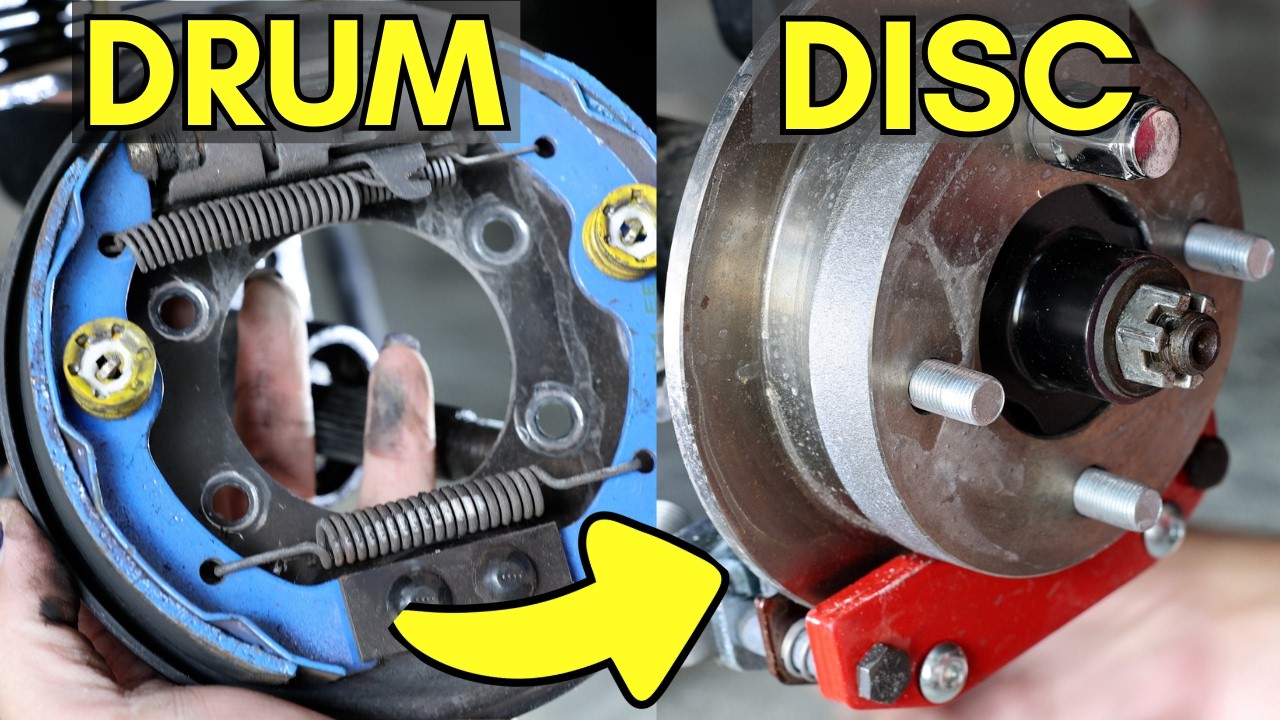
Stuck brakes can lock the wheels even when the motor is spinning at full power.
Free Locked Brake Drums or Calipers
Lift the rear wheels off the ground and try spinning them by hand. They should rotate freely. If they don’t, the brake shoes or calipers are binding. Common causes include:
– Corroded brake rods
– Worn return springs
– Over-adjusted star wheel nuts
Clean rust off the brake assemblies and replace any parts that no longer retract properly.
Release the Parking Brake Fully
An engaged parking brake creates drag strong enough to prevent motion. Double-check that the lever or pedal sits in the off position. Spin the wheels after release to confirm they move without resistance.
Assess Battery Voltage and Connections (Electric Carts)

Weak or unbalanced batteries can power the lights and dash but leave the motor stranded.
Measure Each Battery in the Pack
Use a multimeter to check every battery individually. A fully charged 6V battery should read 6.3V or higher. A 12V battery should read 12.6V or higher. Replace any battery that falls below 80 percent of its rated voltage. One weak cell drags down the entire pack.
Clean Corroded Terminals and Cables
Inspect every battery terminal for white or green corrosion. Disconnect the cables and scrub the posts with a baking soda and water mix. Reconnect tightly and look for melted insulation near the motor. Poor connections mimic motor failure and are easy to overlook.
Look for Broken Keys or Axle Damage

Even with full power reaching the motor, a sheared key or snapped axle stops the wheels from turning.
Lift the Cart and Spin the Wheels by Hand
With the cart safely elevated, press the accelerator. Watch the axle shaft and wheel. If the motor spins but the wheel stays still, the key connecting the gear to the axle has likely sheared off. This requires removing the motor and replacing the key. A broken axle calls for a full replacement on both sides to keep handling balanced.
Test the Forward/Reverse Switch or Contactor
Electric carts route motor direction through a heavy-duty switch. When this switch fails, the motor may run in one direction but not the other, or not at all.
Inspect the Switch Contacts
Open the switch housing and look for burnt or pitted contacts. Use a multimeter to test continuity in both forward and reverse positions. Replace the entire switch assembly if contacts are worn. Cleaning pitted contacts offers only a short-term fix.
Review the Speed Controller or Governor
Modern carts include electronic limiters that restrict speed and power. A faulty controller can block motion even when the motor receives voltage.
Reset the Controller
Many controllers reset with a simple sequence:
– Turn the key off
– Wait 30 seconds
– Press and hold the accelerator
– Turn the key on while holding the pedal
Release the pedal after a few seconds. If the cart still won’t move, the controller may need professional diagnostic or replacement.
Check the Governor Linkage (Gas Models)
On gas carts, the governor controls engine RPM. A stuck or misadjusted governor can choke power at low speeds. Disconnect the governor temporarily for testing in a safe area. Reconnect immediately after diagnosing, since running without a governor risks engine overspeed.
Prevent Future No-Movement Issues
Routine maintenance stops most no-motion problems before they start.
Monthly Inspection Routine
- Check drive belt tension and surface condition
- Spin wheels by hand to confirm brakes release fully
- Inspect battery terminals for corrosion
- Lubricate throttle and shift cables
- Listen for solenoid clicks during acceleration
Seasonal Service Tasks
- Replace drive belts every 2 to 3 years
- Flush rear differential fluid once a year on gas carts
- Balance battery voltage across the pack every 3 months on electric carts
- Store the cart with brakes released and tires off concrete
Frequently Asked Questions About Golf Carts That Run But Won’t Move
Why does my golf cart run but not move in either direction?
A golf cart that runs but won’t move in forward or reverse usually has a drivetrain or brake issue. Common causes include a broken drive belt, seized brake drums, or a failed solenoid. Start by checking the belt and brakes before moving to electrical components.
Can a bad solenoid cause a golf cart to not move?
Yes. The solenoid acts as the main switch between the batteries and the motor. When it fails, power reaches the motor but never engages it. Test the solenoid by listening for a click when pressing the pedal and measuring voltage on the large terminals.
What does it mean if my electric golf cart clicks but won’t move?
A single click usually comes from the solenoid engaging. If the cart clicks but won’t move, the motor, controller, or axle key is likely the issue. Test for voltage at the motor and inspect the axle for a sheared key.
How do I know if my golf cart transmission is bad?
Grinding noises, fluid leaks, or a cart that moves in one direction but not the other all point to transmission problems. Check the rear differential fluid level first. Low or dirty fluid in gas carts causes similar symptoms to worn gears.
Why does my golf cart move in reverse but not forward?
A directional issue often traces back to the forward/reverse switch or a wiring fault specific to one direction. Test the switch contacts for continuity in the forward position. Corroded wires or a bad microswitch can also block forward motion while leaving reverse functional.
Key Takeaways for Diagnosing a Golf Cart That Runs But Won’t Move
A golf cart that runs but won’t move almost always has a broken link somewhere in the power chain. Start with the simplest checks first: verify the gear selector, release the parking brake, and inspect the drive belt on gas models. Electric cart owners should test the solenoid and battery voltage before suspecting the motor itself. Most no-movement problems trace back to one of five components: the drive belt, brakes, solenoid, battery pack, or axle key. By working through these areas systematically, you can identify the fault in under an hour and decide whether a DIY fix or a shop visit makes the most sense.