
You launch Golf Rival ready to play, but the screen freezes on loading or throws a “Server Unavailable” error. It is frustrating, and you are not alone. Many players recently report that Golf Rival is not working due to server outages, crashes, or unstable connections. This guide walks you through every proven fix, from quick device tweaks to full reinstalls, so you can get back on the course fast.
Check Golf Rival Server Status First
Before changing anything on your device, confirm the problem is not a global outage.
Confirm a Widespread Outage
Multiple users across forums and Reddit reported a “Server Unavailable” error in the same timeframe. When several players cannot connect at once, the issue almost always lives on the server side. In one case, players stayed locked out for hours before service quietly returned.
Monitor the Official Twitter Account
The Golf Rival Twitter (X) page is the fastest official channel for outage alerts. Keep in mind developers do not always post instantly. One user noted no update appeared even when the weekend tournament went dark, so expect delays in communication.
Test for Regional Server Issues
Some players report partial access. One user in Europe got in briefly before disconnecting, while North American users could not connect at all. If a few people confirm it is working, you may be dealing with regional routing or lag rather than a full crash.
Restart Your Device to Reset Connections
A simple reboot clears background conflicts and resets your network handshake.
Why Rebooting Fixes Connection Errors
Temporary software glitches prevent apps from opening properly. Restarting flushes cached network data and forces a fresh connection to the internet. Several users confirmed Golf Rival launched normally after a full restart.
How to Restart Correctly
- iPhone: Hold the side button plus a volume button until the power slider appears. Slide to power off, wait 30 seconds, then turn it back on.
- Android: Hold the power button for 5 seconds, tap “Restart,” or power off completely and back on.
- Tablet: Follow the same full shutdown process as your phone.
Wait at least two minutes after rebooting before reopening Golf Rival.
Force Stop and Relaunch the App
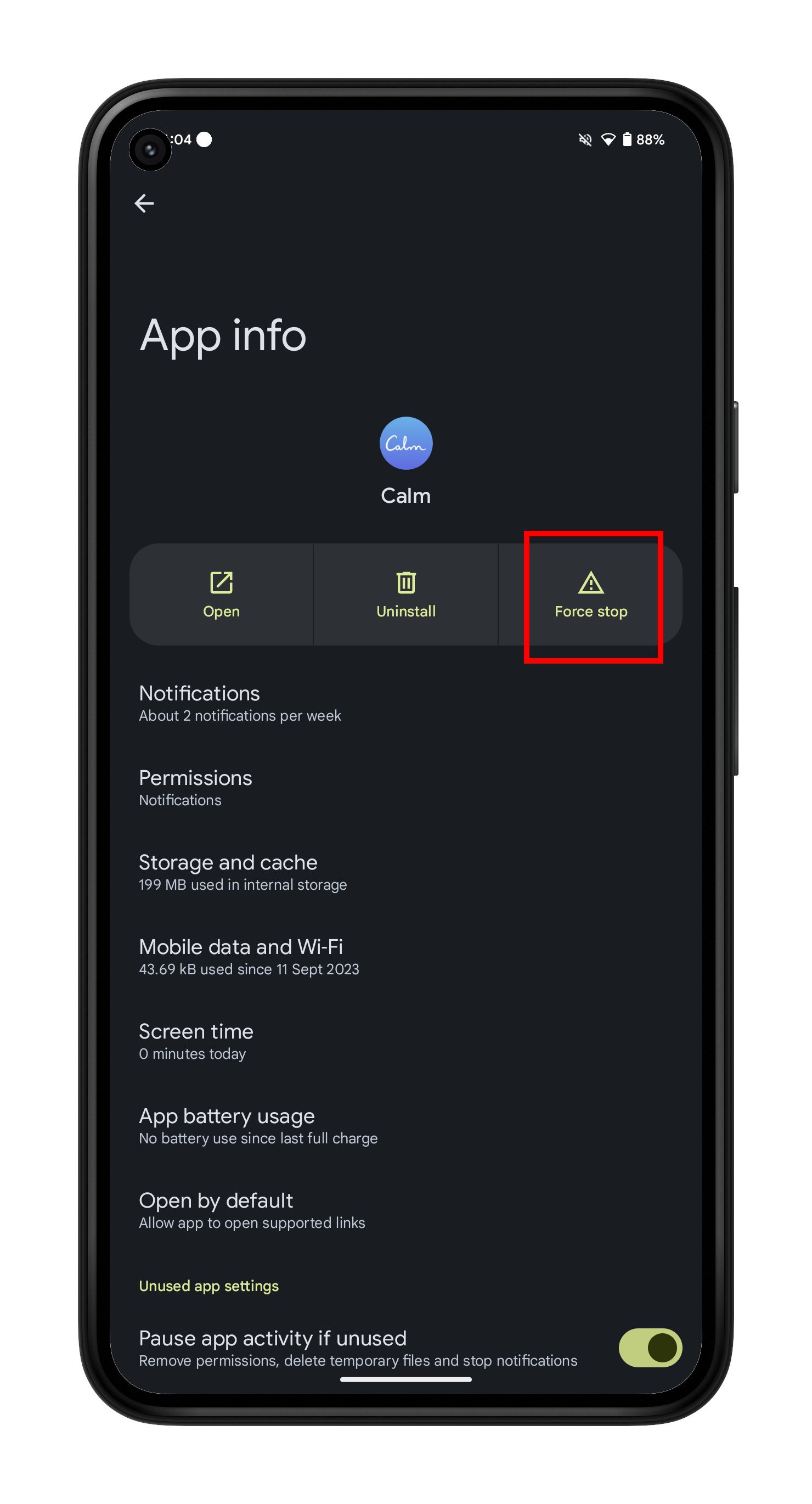
Corrupted background data can block a fresh connection to Golf Rival servers.
Close Golf Rival Completely
- iOS: Swipe up from the bottom (or double-click the Home button), find Golf Rival, and swipe it away.
- Android: Open Settings, then Apps, then Golf Rival, then tap Force Stop.
Relaunch the app from your home screen once it is fully closed.
Avoid Multitasking Before Launching
Heavy app switching overloads memory on older devices. This often leads to crashes or freezes during Golf Rival startup. Close other apps before launching for best results.
Check Your Internet Connection Stability
Unstable Wi-Fi or throttled networks are a leading cause of Golf Rival connection errors.
Test Wi-Fi Speed and Stability
Open a browser and load a few sites. Slow loads or timeouts point to your Wi-Fi. Try these fixes:
- Move closer to your router
- Restart your router
- Forget the network and reconnect with the password
Switch to Mobile Data to Bypass Router Issues
If Wi-Fi keeps failing, switch to cellular data. One player discovered Golf Rival worked on 4G but not on home Wi-Fi, which points to an ISP or router problem.
Avoid Public or Crowded Networks
Cafe hotspots, school Wi-Fi, and shared networks often throttle gaming traffic. High latency on these networks causes timeouts and frequent disconnections.
Clear App Cache on Android Devices
Cached data builds up over time and can corrupt, blocking Golf Rival from launching.
Steps to Clear Cache Safely
- Open Settings, then Apps, then Golf Rival, then Storage.
- Tap Clear Cache only. Do not tap Clear Data unless you accept the risk.
Clearing cache removes temporary files without deleting your account or settings.
When Clearing Data Is Acceptable
Use Clear Data only if the app still refuses to load. Be aware that unlinked accounts will lose all progress permanently.
Reinstall Golf Rival for Persistent Crashes
A clean install removes corrupted files that block server connections.
Follow the Reinstall Steps
- Uninstall Golf Rival from your device.
- Restart your phone fully.
- Reinstall from the App Store or Google Play Store.
- Log in using your linked account.
Protect Your Game Progress First
Link your game to Facebook, Google Play, or Game Center before reinstalling. Without a linked account, uninstalling may erase your progress for good.
Wait for Server Recovery During Outages
When Golf Rival servers go down, no device fix will help until they return.
Common Signs of a Server Outage
- “Server Unavailable” error on multiple devices
- Game shows splash screen but never advances
- Friends and forums report the same problem
- No developer updates on social media
How Long Do Outages Usually Last?
Recent outages ranged from 1 to 6 hours. One user reported being locked out all morning, while others saw service restored by afternoon. Weekend tournaments generate heavy traffic and increase crash risks.
Prevent Future Golf Rival Connection Problems
A few proactive habits keep your game running smoothly.
Enable Auto-Updates
Patches often fix bugs and improve server stability. Turn on automatic updates in your store settings:
- App Store: Settings, then App Store, then enable App Updates.
- Google Play: Settings, then Network, then Auto-update apps.
Play During Off-Peak Hours
Tournaments launch windows and weekends create heavy server load. Playing earlier in the day reduces lag and disconnections.
Stick to Stable Networks
Always play on private Wi-Fi or reliable 4G or 5G. Avoid switching networks mid-round to prevent disconnects.
Common Mistakes That Make Golf Rival Worse
Avoid these habits when troubleshooting connection issues.
Do Not Spam the Launch Button
Tapping the app icon repeatedly spawns multiple background processes. This freezes your device further and delays recovery.
Never Skip Linking Your Account
Local saves are not guaranteed. Always link to Facebook, Google, or Apple before reinstalling. One user lost weeks of progress by skipping this step.
Avoid Third-Party Mods and Hacks
Mods and “speed-up” apps increase crash risks and may get your account banned. Stick to the official version from your app store.
When to Contact Golf Rival Support
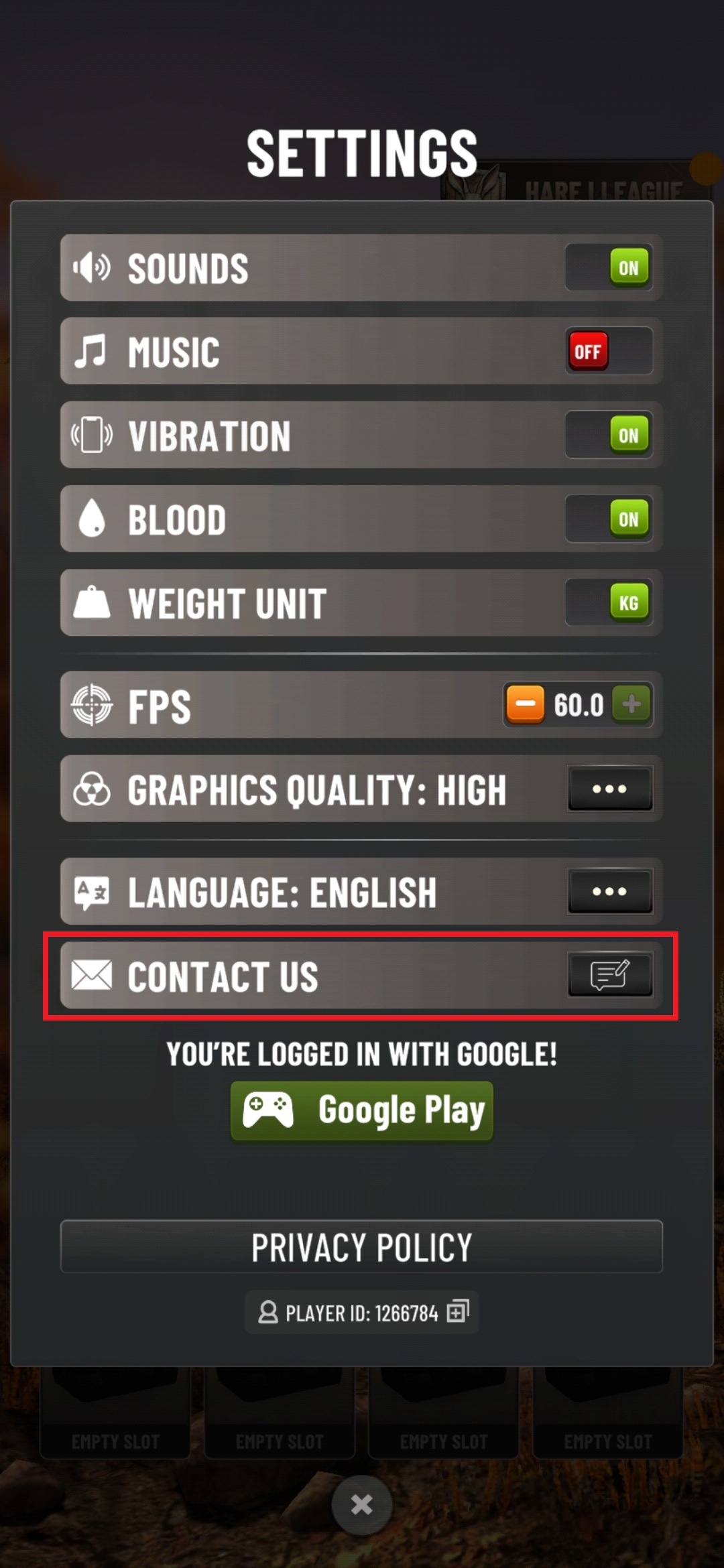
Reach out to support if all fixes fail and the game still refuses to load.
How to Submit a Support Ticket
- Open the game if possible, or visit the official Golf Rival website.
- Navigate to Settings, then Help and Support, then Contact Us.
- Include your device model, OS version, error message screenshot, and a clear description of the issue.
What to Expect From the Support Team
Responses usually take 24 to 72 hours. During outages, replies are often generic “we are aware” messages. For account-specific issues, support can restore progress only if your account is linked.
Frequently Asked Questions About Golf Rival Not Working
Why does Golf Rival show “Server Unavailable” right now?
Most “Server Unavailable” errors come from backend outages or heavy tournament traffic. Check community forums and the official Twitter account to confirm whether other players face the same issue.
How long do Golf Rival server outages usually last?
Recent outages ranged from 1 to 6 hours. Weekend tournaments often cause longer downtime due to increased server load.
Will reinstalling Golf Rival delete my progress?
Reinstalling deletes progress only if your account is not linked to Facebook, Google Play, or Game Center. Always link your account first to protect your data.
Does clearing app cache fix Golf Rival loading issues on Android?
Clearing cache often fixes corrupted temporary files that block connections. Avoid Clear Data unless you accept the risk of losing unlinked progress.
Why does Golf Rival work on mobile data but not on Wi-Fi?
This usually points to router issues, ISP throttling, or DNS problems. Restart your router or switch networks to confirm.
When should I contact Golf Rival support?
Contact support after trying restart, reinstall, and network switches. Include your device model, OS version, and a screenshot of the error message.
Key Takeaways for Fixing Golf Rival Connection Issues
Most “Golf Rival not working” problems trace back to server outages or unstable connections. Start by checking community reports and the official Twitter account for outage confirmation. If servers are online, restart your device, switch networks, clear app cache, or reinstall the app as a last resort. Always link your account before troubleshooting to protect your progress. With these steps, most players regain access within hours, even during major crashes.