Choosing the right indoor golf setup can transform your game, but the sheer variety of options makes the decision harder than your last three-putt. From basic net systems to AI-powered rooms that replicate Pebble Beach in stunning detail, the types of golf simulators available today span every budget, space, and skill level.
Modern golf simulators use radar, high-speed cameras, infrared sensors, and photometric arrays to capture swing data and ball flight with increasing precision. Understanding how these technologies differ helps you avoid wasting money on features you don’t need or, worse, buying a system that can’t deliver the experience you want.
This guide breaks down every major category of golf simulator, explains how each one works, and helps you match the right system to your space, budget, and goals.
Simulator Categories by Technology
The single biggest factor separating types of golf simulators is the tracking technology inside. Each approach offers different strengths in accuracy, cost, and usability.
Radar-Based Simulators
Radar systems emit microwave signals that bounce off your club and ball, measuring speed, spin, and trajectory through Doppler analysis.
These systems excel at capturing real-world ball flight data and work reliably in any lighting condition. Popular models like the FlightScope Mevo+ and TrackMan series are trusted by tour professionals for good reason.
Strengths:
– Exceptional ball flight accuracy
– Reliable in bright rooms or dim basements
– Quick calibration
Limitations:
– Premium pricing
– Needs open space behind the ball
– Some units require floor mounting
Camera-Based Simulators
High-speed cameras photograph club and ball movement at impact, then calculate metrics from the visual analysis.
Systems like SkyTrak, Uneekor QED, and Rapsodo MLM2 Pro use dual cameras (one ball-facing, one down-the-line) to reconstruct your swing. They offer strong accuracy at lower prices than radar.
Strengths:
– Compact footprint
– Lower cost than radar
– Portable designs available
Limitations:
– Sensitive to glare and shadows
– Older models may need marked balls
– Best used in controlled lighting
Infrared (IR) Sensor Systems
IR simulators use grids of infrared beams to detect club movement at impact. When your club breaks the beams, the system calculates basic metrics.
Found in entry-level units like the OptiShot 2 and The Net Return Net R3, these systems prioritize simplicity and affordability over data depth.
Strengths:
– Budget-friendly
– Minimal setup
– Great for casual users
Limitations:
– Basic data only
– No spin axis or advanced metrics
– Not built for serious training
Photometric (Laser/LED) Systems
A newer and less common category, photometric systems use laser or LED arrays to capture swing details with extreme precision.
These are mostly found in research labs and elite coaching studios today. As costs drop, expect more consumer options in coming years.
Simulator Types by Setup & Use Case

Beyond the sensor technology, types of golf simulators also differ based on how they’re built and where they’re installed.
Portable Simulators
Portable setups combine a compact launch monitor with a pop-up screen, net, and travel-friendly projector.
You can assemble one in 10–20 minutes, making them perfect for renters, part-time golfers, or anyone who needs their garage back on weekends.
Permanent Room Installations
These full-scale builds include ceiling-mounted projectors, impact screens, padded flooring, and acoustic treatments for an immersive, theater-like experience.
High-end systems like TrackMan 4 with a custom enclosure or Full Swing Pro rooms deliver unmatched realism but require professional installation taking one to three days.
Net-Only Simulators
The simplest option: a hitting mat, net enclosure, and optional tablet for shot data.
These focus on safe ball containment and basic feedback rather than full course play. Many golfers use them for winter chipping practice or off-season short-game work.
Commercial-Grade Simulators
Found in golf entertainment venues, ranges, and coaching facilities, commercial simulators are built for daily heavy use.
They feature reinforced screens, enterprise software, multi-user scheduling, and payment system integration. Golfzon and AboutGolf dominate this segment.
Launch Monitor Integration Models
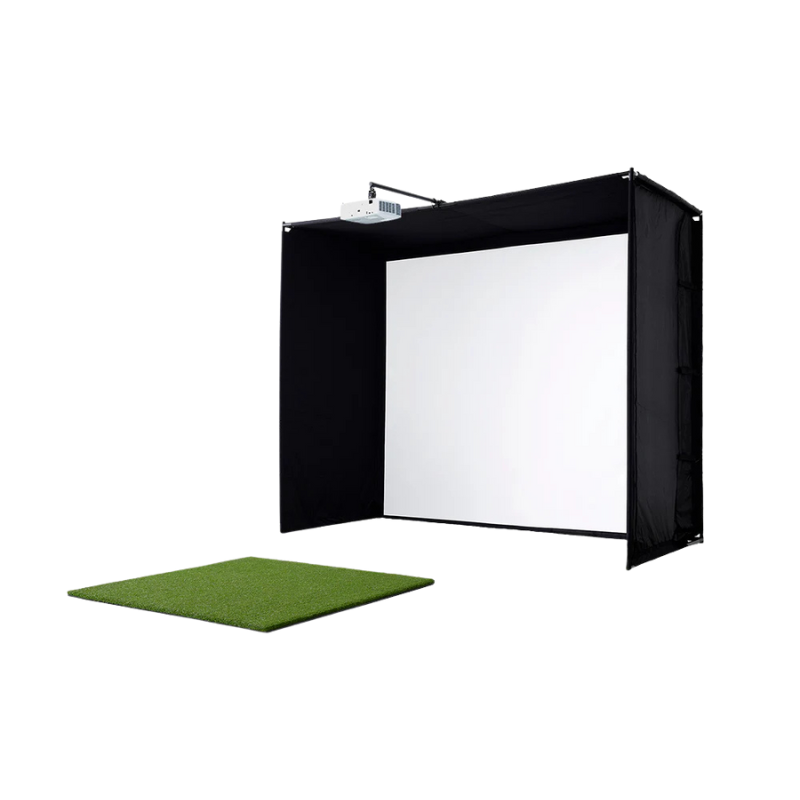
Another way to categorize types of golf simulators is by how the launch monitor fits into the system.
All-in-One Simulators
These bundle the launch monitor, software, screen, and projector into a single purchase. Install it, turn it on, and play.
Examples include Golfzon Vision Premium and Uneekor EYE XO2. They offer plug-and-play simplicity with guaranteed compatibility.
Pros:
– Hassle-free setup
– Single point of support
– Optimized performance
Cons:
– Limited customization
– Higher total cost
– Harder to upgrade individual parts
Modular Simulators
Modular builds let you mix and match components. Pair your favorite launch monitor with the software, screen, and mat that fit your budget.
For example, combining a SkyTrak+ with E6 Connect software and a Carl’s Place impact screen is a popular modular setup among home users.
Pros:
– Full customization
– Upgrade one piece at a time
– Often better value
Cons:
– More complex setup
– Compatibility research required
– May need a tech-savvy owner
Entry-Level vs. Premium Systems
Price tiers offer another clear way to compare types of golf simulators.
Budget-Friendly Options ($500–$2,000)
Entry-level systems use IR sensors or basic cameras to deliver simple metrics and a handful of virtual courses.
OptiShot 2 and SwingBay lead this category. They work well for casual players who want occasional indoor rounds without a major investment.
What you typically get:
– Basic swing metrics
– 1–5 virtual courses
– DIY assembly
Mid-Range Systems ($2,000–$6,000)
The sweet spot for most home users, mid-range systems use quality cameras to capture full ball flight data and run advanced software.
SkyTrak+, Mevo+, and Uneekor QED dominate this range. You’ll get launch angle, spin rate, carry distance, and access to 100+ courses through platforms like E6 or GSPro.
What you typically get:
– Full ball flight data
– 100+ courses
– Better graphics
– Mobile app control
High-End Professional Systems ($15,000–$60,000+)
These are the simulators you see on TV during tour events. TrackMan 4, Foresight GCQuad, and FlightScope X3 deliver millimeter-level precision and unmatched realism.
You’ll get 3D swing analysis, commercial licensing, and weather effects that make virtual rounds feel real. This tier is built for serious players, coaches, and commercial facilities.
Software-Driven Simulator Types
The software powering your simulator shapes the entire experience, from course graphics to stat tracking.
Proprietary Software Systems
Some brands lock their software to their hardware. Golfzon’s software only works with Golfzon simulators, and Full Swing software pairs exclusively with Full Swing hardware.
This approach ensures optimized performance and regular updates, but limits your flexibility to switch programs or access community-created courses.
Open-Platform Simulators
Open systems let you run multiple simulation programs on the same hardware. Most launch monitors from SkyTrak, Foresight, and Rapsodo support this approach.
You can play E6 Connect, The Golf Club (TGC), GSPro, or Creative Golf depending on your mood. Community-created courses add nearly unlimited variety.
Space & Room Configuration Types

Your room dimensions play a huge role in which types of golf simulators will actually work for you.
Compact Simulators for Small Spaces
Designed for rooms under 10′ x 10′, these use short-flight algorithms to simulate shots without requiring massive ball travel.
The OptiShot 2 Short Room Package and TruGolf Mini fit into tight spaces. Minimum requirements are roughly 8′ wide, 8′ deep, and 7.5′ tall.
Standard Home Simulators
Most home setups fit into garages, basements, or spare rooms with 10′ x 12′ dimensions and 9′ ceilings.
This size supports full swings with standard launch monitors and leaves room for proper backswing clearance (6–7 feet) and screen padding.
Large-Scale Simulator Rooms
Dedicated spaces like converted basements or commercial buildings allow for premium builds with 120″–180″ screens, surround sound, and lounge seating.
You’ll get the full theater experience plus room for friends, family, or clients to watch you play.
Choosing the Right Type for You
With so many types of golf simulators on the market, the best choice comes down to matching your priorities.
Ask yourself these key questions:
– Do you want realistic course play or pure swing analysis?
– How much space can you dedicate?
– Is this for casual fun or serious improvement?
– Will you want to upgrade later?
Here’s a quick decision framework:
| Goal | Best Simulator Type |
|---|---|
| Casual play, low budget | Net-only or IR sensor system |
| Serious home practice | Camera-based modular system |
| Pro-level accuracy | Radar-based all-in-one (TrackMan, GCQuad) |
| Tight space | Compact simulator with short-flight software |
| Future upgrades | Modular setup with open software |
| Business or league play | Commercial-grade system |
Frequently Asked Questions About Types of Golf Simulators
What is the most accurate type of golf simulator?
Radar-based and high-end photometric systems deliver the highest accuracy, with TrackMan and Foresight GCQuad being the gold standard. Camera-based systems like SkyTrak offer strong accuracy at lower price points but generally fall slightly below radar precision for advanced metrics like spin axis.
How much space do I need for a home golf simulator?
Most home setups need at least 10′ wide, 12′ deep, and 9′ tall for full swings. Compact simulators designed for apartments can work in spaces as small as 8′ x 8′ x 7.5′, though they use short-flight algorithms to simulate shots rather than tracking real ball flight.
Are budget golf simulators worth buying?
Budget simulators under $2,000 work well for casual play, basic swing feedback, and short-game practice. They typically lack the accuracy and course variety needed for serious training, but they offer excellent value for beginners and recreational golfers.
Can I upgrade my golf simulator over time?
Modular simulator setups are built for upgrades. You can start with an entry-level launch monitor and software, then add a better projector, larger screen, or premium monitor as your budget allows. All-in-one systems are harder to upgrade since components are bundled together.
Do golf simulators need special lighting?
Camera-based and infrared systems perform best in controlled lighting with minimal glare. Radar-based simulators work well in any lighting condition. If your space has lots of windows or harsh overhead lights, consider blackout curtains or indirect lighting for optimal camera performance.
How long does it take to install a permanent golf simulator?
Professional installation of a permanent room typically takes one to three days, depending on complexity. This includes mounting the projector, installing the impact screen, setting up flooring, and configuring software. Portable setups can be ready in 10–20 minutes.
Final Thoughts on Choosing the Right Golf Simulator
The best types of golf simulators are the ones that match your specific goals, space, and budget rather than the most expensive option on the market. Start by defining what matters most: realistic course play, detailed swing metrics, portability, or pure entertainment value.
Once you know your priorities, use the technology categories above to narrow your choices. A camera-based modular system covers most home golfers’ needs at a reasonable price. Serious players who demand tour-level data should invest in a radar-based system like TrackMan or GCQuad. Casual users and beginners can get plenty of enjoyment from a budget-friendly net or infrared setup.
Your next step is measuring your available space and setting a realistic budget. From there, you’ll find the perfect simulator to keep your game sharp year-round, no matter the weather outside.